
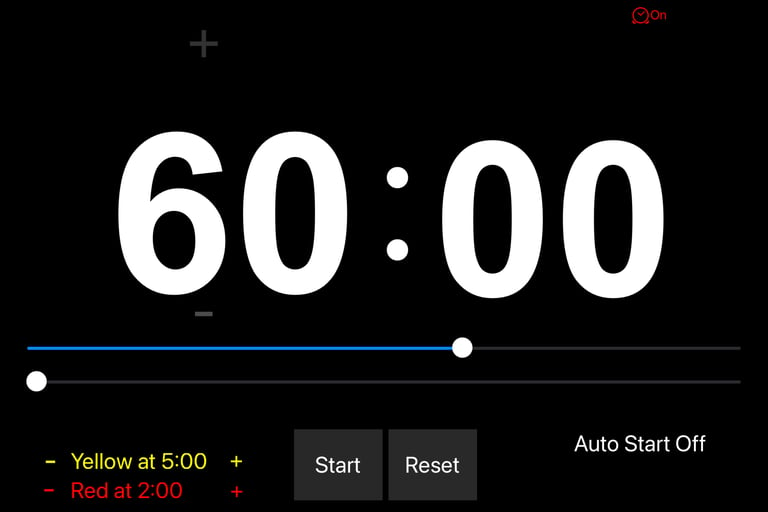
This app is a countdown timer, designed for presenters (on a stage or at a podium or pulpit) to keep them on time. Most features are self evident, however there are a couple of features that need to be covered.
1. AutoStart
To use this feature, simply click on Auto Start to toggle it On or Off When it is on, you have the option to adjust the time to when you would like to the countdown to begin
2. Clock Mode
The Icon at the top right will turn Clock Mode on or Off.
If it is On, after the countdown finishes, the application will switch over to show the current time.
3. PowerPoint Remote
Using a Lightning (or whatever connection your device has) to USB adapter, you can connect a PowerPoint Remote to the iPad On the remote, you can press the bottom button to Start / Stop (and reset) the countdown While the timer is stopped, pressing the left & right buttons, will increment or decrement the time by five minute intervals. While the timer is running, pressing the left & right Buttons will increment or decrement the time by one minute
Note: Click on Developer Website to see instructions for using the PowerPoint remote.
Stage Timer
# Privacy Policy for Stage Timer
We respect your privacy. This Privacy Policy explains how we handle information when you use our mobile app. ### 1. Information We Collect Remote Stage Timer does not collect, store, or transmit any personal data from you. - No names, email addresses, phone numbers, locations, device identifiers, or usage analytics are gathered. - No data is sent to us or any third-party servers. The app only processes timer settings, countdown values, warning thresholds, and display preferences locally on your device.
Children's Privacy: Stage Timer is not directed to children under 13 (or the applicable age in your region), and we do not knowingly collect data from children. Changes to This Policy: We may update this Privacy Policy from time to time. Any changes will be posted here with an updated effective date. If you have questions about this Privacy Policy, contact me at: rick@av1611audiovisual.com.
Thank you for using Stage Timer!

Contact
615.584.8270
info@av1611audiovisual.com